 MY BOWLING JOURNEY
Walking into a house you haven't bowled in for a month? Shoes by Center tells you what you wore there: the heel and sole you noted at each center, most worn first. It's on the Center chip, and it's free.
Noting your shoes
- On Scoring, open the sheet after a ball (it comes up by itself, or tap Details).
- Open Shoes and type your Heel #, your Sole #, or both.
- Close the sheet. They're saved with that frame.
They stay filled in for the frames after, so note them once and again only when you change them. More on the sheet: Details: ball, surface and where the ball went.
Reading it
Each center has its own block, the busiest first:
- The center's name, and the nights you noted your shoes there.
- Each setting, like "Heel 3 · Sole 6", with a bar for its share of your frames there. The first one is what you usually wear, in bigger type.
- Beside each setting, your strike rate in it, like "52% strikes". Until a setting has 30 frames, it shows its frames out of the center's instead, like "8 of 40 frames".
- When you changed your shoes partway through a night, a line counts those nights, like "Nights with a change partway through: 2 of 9".
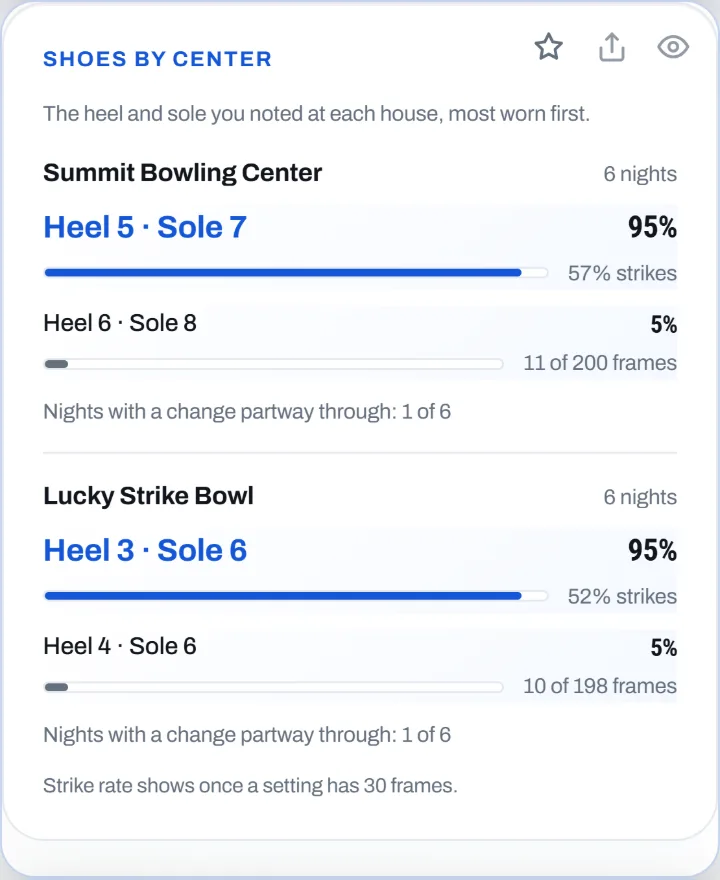
A center with no name saved shows as Unknown center.
What it counts
- Frames with a heel or sole noted, on league nights at a league with a center set. Set a league's center in Setup > League > My leagues.
- Tournaments, practice and open bowling aren't on it. 9-pin no-tap nights are left out, unless they're all you bowl.
- This season or Career, whichever is picked at the top of Stats.
There's no "?" on this card. It says what it is.
When it shows
Shoes by Center shows once you've noted a heel or a sole on a frame, in a league with a center set. Until then it's on the Not yet list at the bottom of the Center chip.