 MY BOWLING JOURNEY
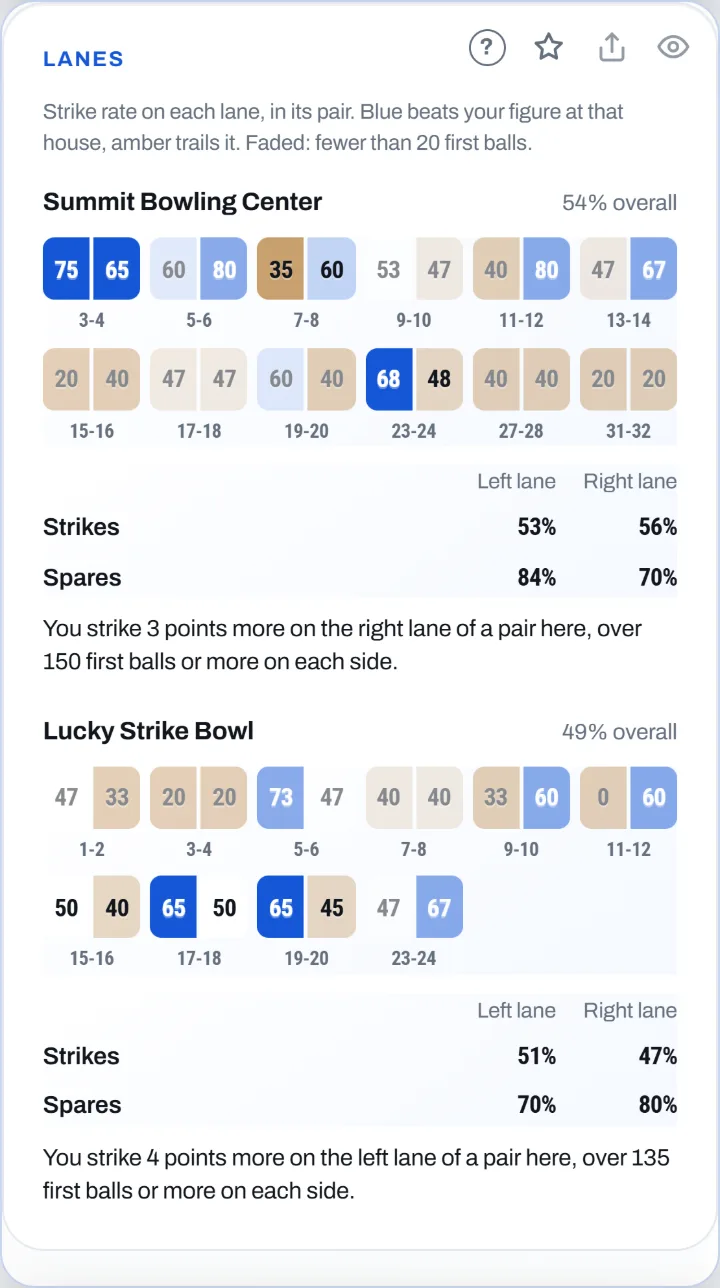
The two lanes of a pair are often dressed or worn differently. Lanes shows your strike rate on every lane you've bowled, in its pair, center by center. It's on the Center chip, and it's free.
Where the lanes come from
Type your Starting Lane on Set up. With Pair, the app knows which lane each frame was on from there: odd frames on the lane a game starts on, even frames and the 10th on the other, and each game starting on the other lane from the last. With One lane, every frame is on it. See The Set up screen.
A night with no starting lane typed isn't on the card.
Reading it
Each center has its own block, the busiest first, with your strike rate there overall, like "54% overall".
- The pairs: each pair shows its left lane and its right lane, with the lane numbers under them, like 7-8. The number on each lane is your strike rate there. A dash means you never threw a first ball on that lane.
- The colors: blue beats your strike rate at that center, amber trails it. The further off, the stronger the color. No color means it's close.
- Faded: fewer than 20 first balls on that lane.
- Left lane and Right lane: your Strikes and Spares on all the left lanes of the pairs together, against all the right lanes. In each pair the left lane is the odd number.
- When one side strikes 3 points or more above the other, with 20 first balls or more on each, a line says so, like "You strike 3 points more on the right lane of a pair here, over 150 first balls or more on each side."
What it counts
- Strikes are out of the first ball of each frame.
- Spares leave out splits, and count only the leaves where you marked the spare made or missed.
- League nights by their league's center, and tournament blocks by the event's center. A league with no center set shows under the league's name. A tournament with no center set shows under its name.
- Practice and open bowling aren't on Stats. 9-pin no-tap nights are left out, unless they're all you bowl.
- This season or Career, whichever is picked at the top of Stats.
When it shows
Lanes shows once you have 20 first balls on lanes at one center. A center with fewer isn't listed yet. Until then the card is on the Not yet list at the bottom of the Center chip.
It's your own card, so it's hidden while you compare with someone or look at a team on Mine.