 MY BOWLING JOURNEY
Not every teammate has the app yet. Save their spot on your roster now and score them every week. When they sign up, the spot and everything you logged for them become theirs.
You don't need their email. A code you text them works the same way.
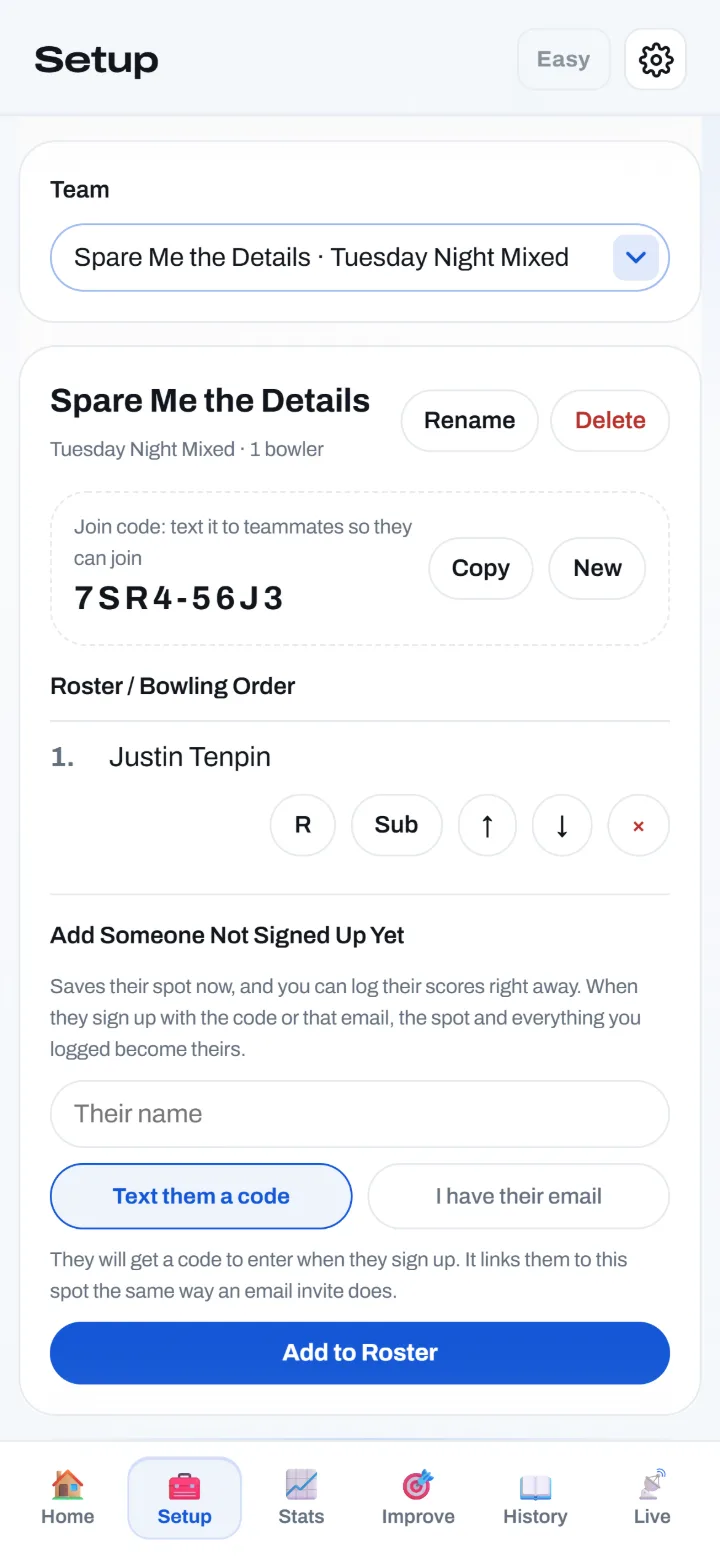
Add them
- Go to Setup > Team > My teams and pick your team.
- Under Add Someone Not Signed Up Yet, type their name.
- Pick how they'll claim the spot:
- Text them a code, picked to start: "They will get a code to enter when they sign up. It links them to this spot the same way an email invite does."
- I have their email: type their email in the box that opens.
- Tap Add to Roster.
They join the bottom of the roster, their name in italics, with "placeholder · no email on file" (a code) or "invited · not signed in yet" (an email) under it. Move them up the order, set their hand and mark them Sub like anyone else. See Your team and roster.
What the app can say:
- "Ally Lane is already on this roster. Scores are kept by name, so add a last initial to tell them apart."
- "That doesn't look like an email address."
- "There's already a pending invite for that email on this team."
Send the code
The code is under their name on the roster, like ABCD-2345, until they use it.
- Text opens your phone's share sheet with the message "Join our team on My Bowling Journey: sign up and enter code ABCD-2345".
- Copy copies the same message.
A code works for 30 days from when you add them.
Score them now
They're on your team from the moment you add them. On league night, tap their name under Who are you keeping score for tonight? on Set up and score them like any teammate. See Scoring for your team and for subs.
Their games count for your team in Stats. In Compare To, they show with "(pending)" after their name. Frames read for them off a scorecard photo you import are saved with yours, the same as scoring them live. See Sending teammates their scores.
How they claim the spot
With the code:
- Signing up, on the first screen, they tap Got a join code from your captain?, type the code in the Join code box and tap Start Bowling. See Creating an account.
- Already past that screen? Setup > Team > Join or add, under Have a join code? Enter it here.
Either way they land in the spot you made: the same place in the order, the same hand and the same Sub.
With the email: when they sign up with that email, your invitation waits in their Inbox: Join team or No thanks. If they already have the app on that email, it waits there too.
Once the spot is theirs, everything logged for them under that name in your team's league moves to their account: their nights, their frames and their game scores. If they already saved a night of their own, theirs is kept.
Claiming a spot follows the same checks as any way onto a team: one team on the free plan, and one role per league. See Joining a team.
Taking a spot off
Tap × on their row. The app asks first: "Take Gus Gutterson off the roster? Scores you logged for them stay." Anyone on the team can take off a spot that hasn't been claimed.