 MY BOWLING JOURNEY
When something needs you, a 📥 button with a red number shows at the top right of the screen. Tap it to open the Inbox. With nothing waiting, there's no button.
The number counts things to do, not records: three tasks from one coach are one.
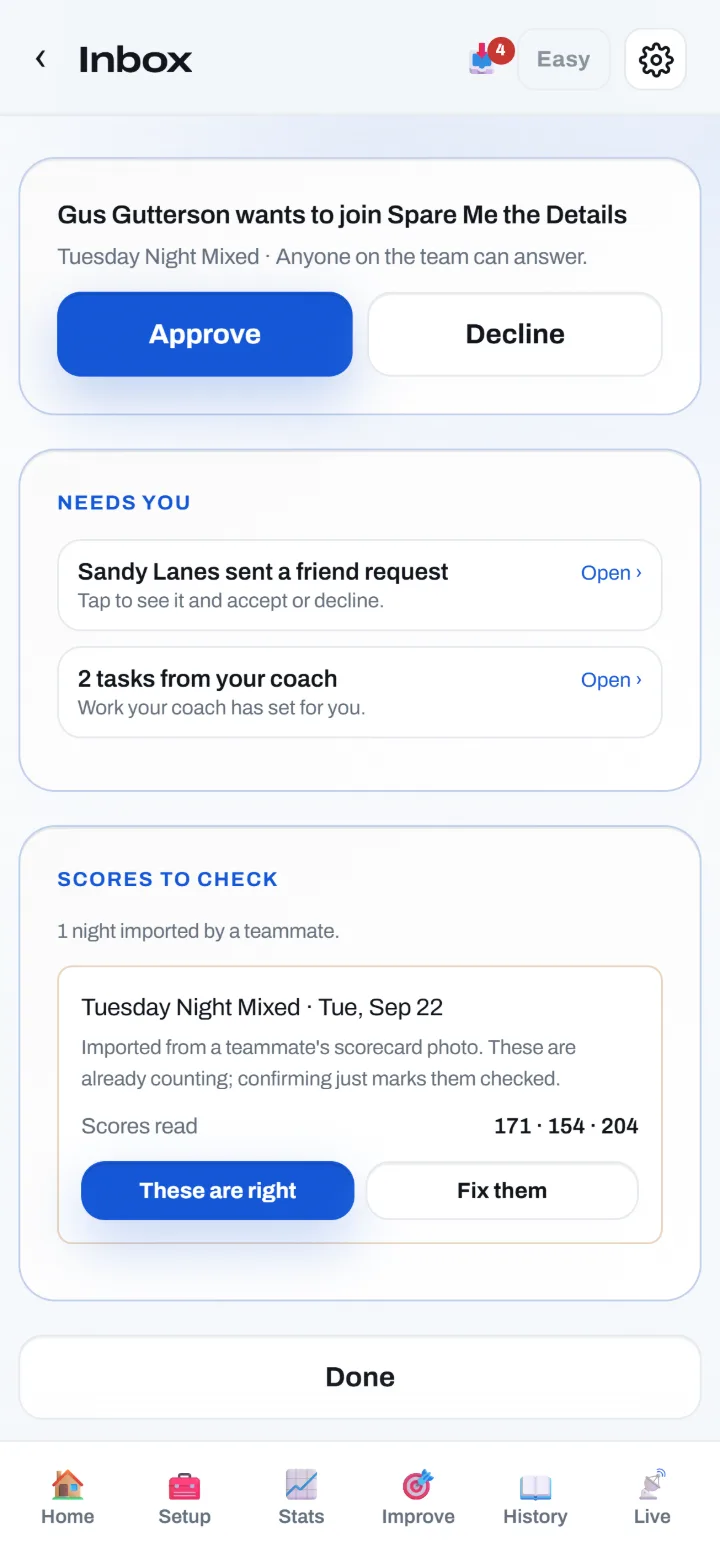
What's in it
Top to bottom:
Requests to join your team. You answer these right here: a bowler asking to join your team, like "Gus Gutterson wants to join Spare Me the Details". "Anyone on the team can answer." Tap Approve or Decline. More in Joining a team.
Needs You lists things you answer on another screen. Tap one to go there:
- A friend request, like "Ally Lane sent a friend request". It opens Friends.
- Tasks from your coach, like "2 tasks from your coach". In coach view, the task updates from your bowlers instead. See Working with a coach.
- Book average needs updating, when one of your leagues has finished its season, like "Thursday Classic has finished its season." See Book average.
- "Your specs for (ball) were rejected": other bowlers voted down the specs you shared for a ball.
An invitation from a team that added you with your email, under Team Invitation: "Join Spare Me the Details?" with the name and place in the order they gave you. Tap Join team or No thanks. See Adding a teammate who isn't signed up.
Scores To Check: nights a teammate imported from a scorecard photo with your games on them. Needs Re-entering: nights you said weren't yours. Both are on Sending teammates their scores.
Once everything's answered, the Inbox says Nothing Waiting: "Requests, coach tasks and scores to confirm show up here." Tap Done to leave it.
Getting told on your phone
Your phone can tell you when something arrives. In Settings > Notifications:
- Requests from people: friend, coaching and team requests and invitations.
- Imported scores: a teammate imported a scorecard with your games on it.
- Coach activity: tasks and notes from your coach, and your bowlers' updates.
See Notifications.