 MY BOWLING JOURNEY
Weekly Points puts your team's points on a chart, one bar per league night, so you can see the hot streaks and the slumps. It's on the Team chip in Stats, and it's free.
Reading the chart
- Each bar is one night, oldest on the left. Under it is the date, month then day, like 09-24.
- The bar's height is the points your team won that night. The scale runs up to the most points marked on any one night: 4 in a 3-game league, 3 in a 2-game league.
- Green: your team won more than half the points marked that night.
- Grey: exactly half, like 2 of 4.
- Red: less than half.
- Tap a bar to see the night's points, like 3/4, beside the opponent's name. With no opponent typed, it says Points won.
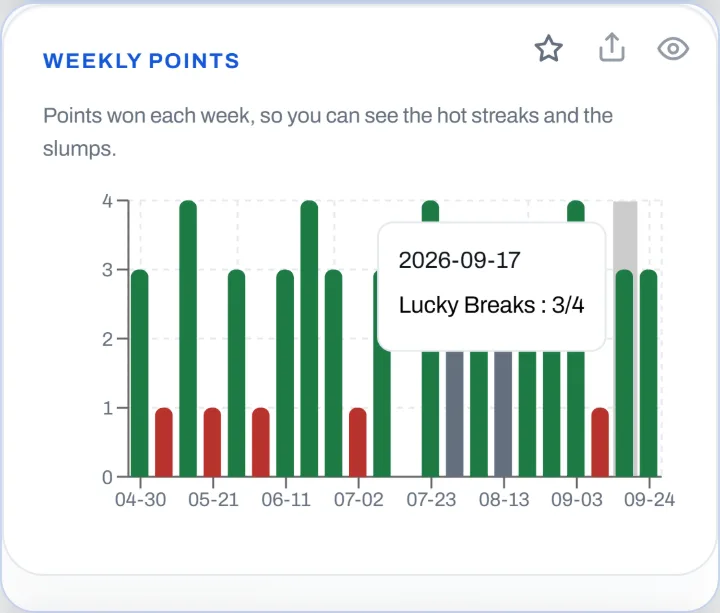
The opponent is the name typed in Opponent on that night's Set up.
Where the points come from
From Points Won on each league night's Results tab: a point for each game your league bowls a night, then Pinfall. How to mark them is on Side games during a night.
Only marked points count. A night where 3 of the 4 points were marked has a bar out of 3, and a night with nothing marked (only an opponent or a handicap typed) has no bar.
What it counts
- The team picked at the top of the Team chip, in its league.
- This season or Career.
When it shows
Once two nights have a point marked won or lost. Until then it's on the Not yet list: "Points won each week. Record match results on a league night."
The season's total is on Season Record.