 MY BOWLING JOURNEY
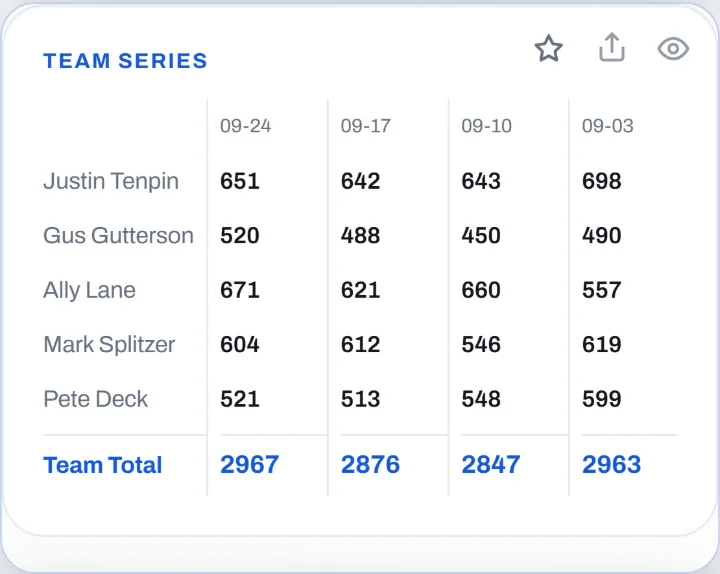
Team Series lines up your team's nights: a column for each night, a row for each bowler, and the Team Total at the bottom. It's on the Team chip in Stats, and it's free.
Reading it
- The newest night is on the left. When there are more nights than fit, swipe the columns sideways. The names stay where they are.
- Each column's heading is the night's date, month then day, like 09-24.
- The bowlers are in your team's lineup order.
- Each number is that bowler's series: all their games that night added up.
- A dash means no series for that bowler that night. They didn't bowl, or nobody scored them.
- Team Total adds up the series in its column.
Where the series come from
A bowler's saved game scores for the night, typed or scored frame by frame. If a bowler has frames on a night but no score saved for it, the games they finished frame by frame are added up. A game that wasn't finished isn't counted.
What it counts
- Nights bowled for the team picked at the top of the Team chip. A night with only one of you scored still gets a column, with dashes for the rest.
- This season or Career.
When it shows
Once your team has two bowlers or more and a night with a series. Until then it's on the Not yet list: "Team totals by night. Needs team-mates with logged scores."
Your team's best night is on Team Records.