 MY BOWLING JOURNEY
How does your spare shooting stack up against other bowlers at your level? Bowlers like you puts your league figures beside bowlers in the same average range as you. Their figures are combined anonymously: you never see a name. It's Pro.
What it shows
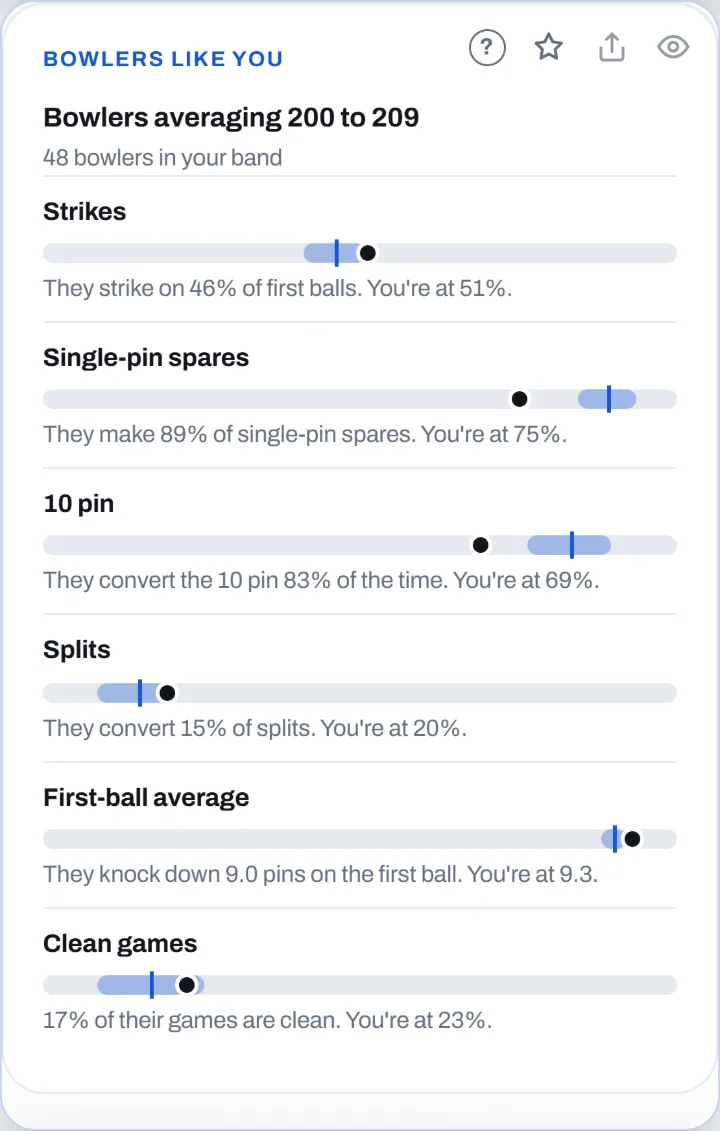
- A title naming your band, like "Bowlers averaging 200 to 209". The bands are ten pins wide, from "Bowlers averaging under 150" to "Bowlers averaging 230 and up".
- How many bowlers are in it, like "48 bowlers in your band".
- A row for each figure: Strikes, single-pin spares, your corner pin (the 10 pin, or the 7 pin if you're left-handed), Splits converted, first-ball average and clean games.
Each row has a bar and a sentence:
- The shaded part is the middle half of the bowlers in your band, the line is their midpoint, and the dot is you.
- The sentence puts the midpoint and you side by side, like "They make 82% of single-pin spares. You're at 76%."
Your band comes from your own average over the games it counts. A spare row shows once you've had 5 tries at that kind of spare.
What it counts
Your games and everyone else's are counted the same way:
- This season's 10-pin league games, scored frame by frame, all ten frames.
- First balls only: a 10th frame counts by its first ball.
- No practice, open bowling or tournaments, no 9-pin no-tap league or frame, and no league you bowl in as a sub.
- This season starts at your league's start date when it's within the last year, otherwise on 15 August.
It's one bowler's card: it shows on Mine with you or a friend under Viewing, not a team.
When it shows
It needs 9 league games scored frame by frame this season, and 25 bowlers in your band. Until then it waits under Not yet at the foot of Mine:
- Under 9 games: "Your figures against bowlers who average what you do. Log 9 league games shot by shot this season."
- A band that's still filling: "Your figures against bowlers who average what you do. Fills in once enough bowlers in your range are counted."
Turning it off or on
It's on unless you turn it off, on the free plan too. While it's on, your figures are counted, anonymously, with everyone else's in your band.
- Go to Settings > Profile.
- Open Compare with other bowlers.
- Tap Off or On.
Off takes you out of the other bowlers' figures and hides the comparison. The card then says so, with Turn on to switch it back. See Your privacy.
On the free plan
It's listed on the Pro on this tab note at the foot of Mine, with See what Pro adds.
With Pro, Insights on Improve also shows one line from it at the top: the figure where you're furthest below the middle of your band.
The ? says: "Your numbers beside bowlers in your 10-pin average range. The shaded band is the middle half of them, the line is their midpoint and the dot is you."