 MY BOWLING JOURNEY
Bad signal at the lanes is normal, and the app is built for it. Everything you enter is saved on your phone first, then sent to your account when there's a connection. Nothing you score waits on the signal.
Scoring with no signal
Once the app is open, score the whole night as usual: frames, game scores, side games, points and notes. Save the night the same way too.
The website is different: it needs a signal to open. For a night in a basement with no bars, use the phone app.
When it reaches your account
- Your phone sends what's waiting by itself, in the order you entered it, as soon as it has a connection. It keeps trying the whole time the app is open.
- Back on Wi-Fi or a signal? Open the app and give it a moment.
- Your other phone, or the website, picks the night up the next time the app opens there. See Two phones and the web.
Checking what's still waiting
The app doesn't put up a sign while it sends. To check:
- Tap the gear (Settings) at the top right.
- Tap the Your data tile and open Refresh from the Cloud.
- If anything is still waiting, the card says so, like "You have 3 changes still waiting to save. They will be sent first."
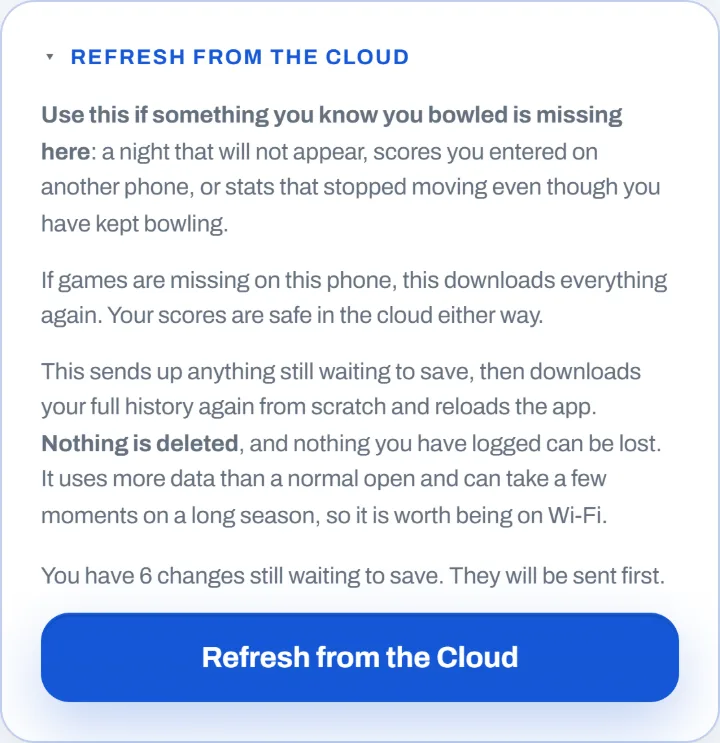
No line about changes waiting means everything has reached your account.
Before you sign out or delete the app
Until it's sent, what's waiting lives only on this phone.
- Don't sign out or delete the app until you've had the app open with a signal. If you tap Sign out with changes waiting, the app warns you first: "3 changes have not reached the cloud yet. Signing out now may lose them. Sign out anyway?"
- Refresh from the Cloud is safe any time. It sends what's waiting first, then downloads your history again, and nothing is deleted. See Refresh from the Cloud.
What needs a signal
Scoring doesn't, but a few things only work online. Without a signal they say so, usually with "Check your connection and try again.":
- Live: sharing your scores and watching a bowling center.
- Scorecard Snap, The Nightcap, Insights and The Caddie.
- Adding a friend, joining a team or a league with a code, and team requests.
- Signing in, subscribing and restoring a purchase.
- Changing your name: "Couldn't change your name without a connection. Try again when you're back online."