 MY BOWLING JOURNEY
Your scores are kept in the cloud as well as on your phone. Each time the app opens, it brings down only what's changed. If something you know you bowled isn't showing on this phone, Refresh from the Cloud downloads all of it again. It's free, and nothing is deleted.
When to use it
- A night that won't appear.
- Scores you entered on another phone or on the web that haven't shown up here.
- Stats that stopped moving even though you've kept bowling.
A missing night isn't always a download problem. The season you're looking at, a hidden league or a night with no league can hide one too: see A night or game is missing.
Refresh
- Tap the gear (Settings) at the top right.
- Tap the Your data tile.
- Open Refresh from the Cloud.
- Tap the Refresh from the Cloud button. It says Refreshing… while it works.
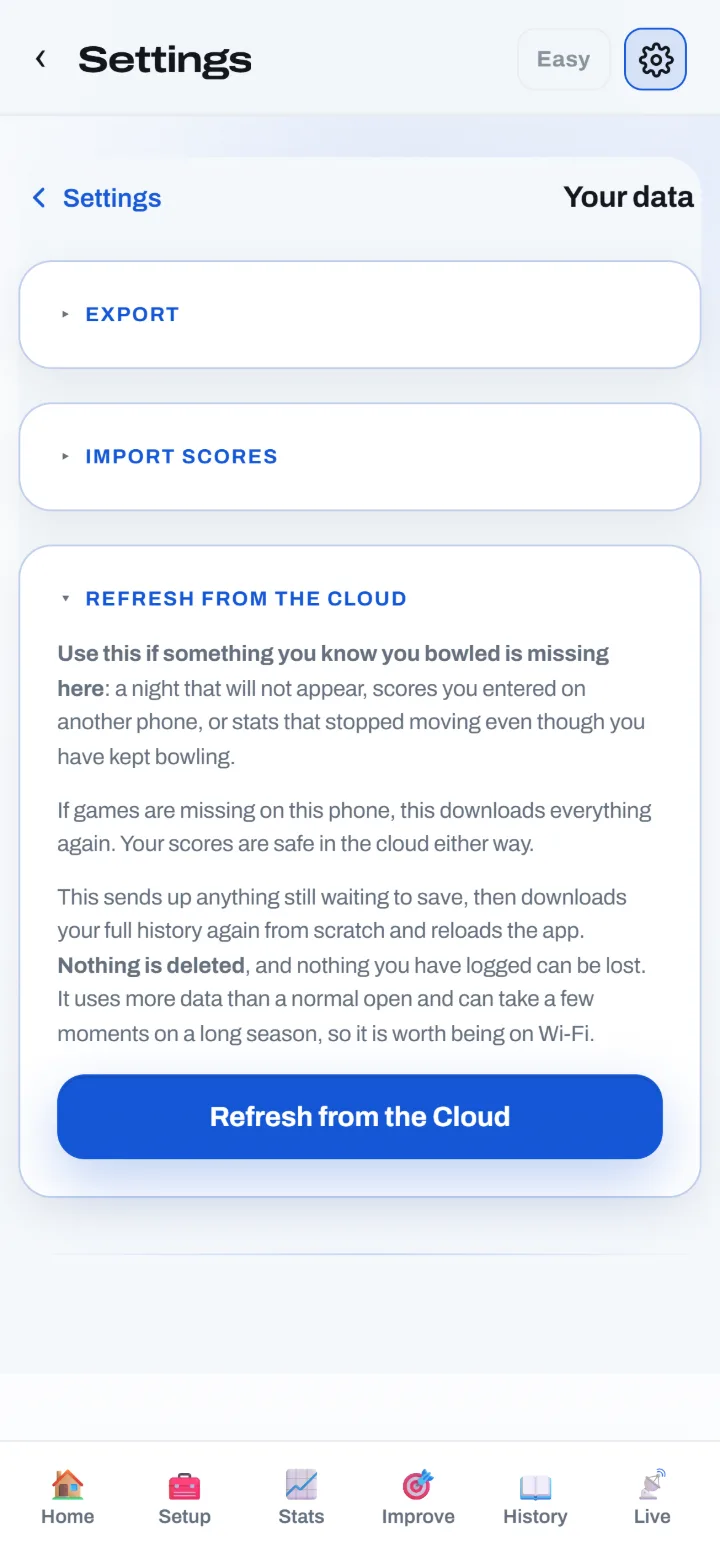
Here's what happens:
- Anything still waiting to save on this phone is sent first. If something is waiting, the card says so first, like "You have 2 changes still waiting to save. They will be sent first."
- Your whole history downloads again from scratch.
- The app reloads.
"If games are missing on this phone, this downloads everything again. Your scores are safe in the cloud either way."
It uses more data than opening the app normally, and on a long season it can take a few moments, so Wi-Fi is best.
If it says "Could not clear the sync markers on this device. Nothing was changed.", nothing was touched. Try again.
Bowling where there's no signal is covered in Bowling with no signal.