 MY BOWLING JOURNEY
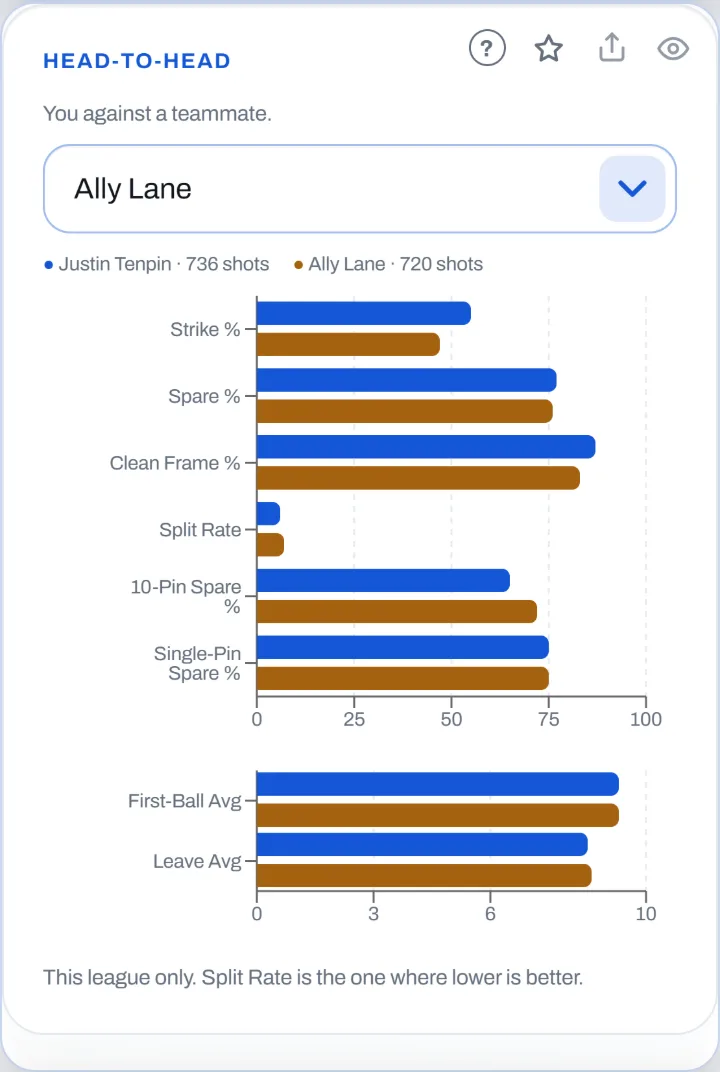
Head-to-Head puts you beside one teammate, figure by figure, as pairs of bars. It's on the Team chip in Stats, and it's Pro.
Pick a teammate
- Open Stats and tap the Team chip.
- On Head-to-Head, tap the box under the title. It lists every teammate with frames in your team's league, most shots first, and opens on the one with the most.
- Pick a teammate. The bars change to them.
Under the box, a key names you both with your shots, like "Justin Tenpin · 736 shots". Your bars are one color, theirs another.
The figures
The top chart is in percent, 0 to 100:
- Strike %: strikes out of first balls at a full rack.
- Spare %: spares made out of the leaves you had a chance at, splits left out.
- Clean Frame %: frames closed with a strike or a spare.
- Split Rate: how often a first ball leaves a split. Lower is better on this one.
- 10-Pin Spare %: how often the 10 pin left alone gets made. A left-hander sees 7-Pin Spare %, and each of you is counted on your own corner pin.
- Single-Pin Spare %: every single-pin spare together.
The bottom chart is in pins, 0 to 10:
- First-Ball Avg: pins on the first ball at a full rack. A strike counts as 10.
- Leave Avg: pins on the first balls that didn't strike.
Each figure is worked out the way your own cards on Mine work it out, for this league only. A figure neither of you has yet is left off.
What it counts
- Every frame each of you has in this league for the team picked, not only the nights you both bowled.
- This season or Career.
- Frames only. Games typed as totals aren't in it.
When it shows
With Pro, once you and at least one teammate have frames in your team's league. Until then it's on the Not yet list: "You against a teammate. Needs frames for you and at least one teammate in this league."
On the free plan, Head-to-Head is listed under Pro on this tab at the bottom of the Team chip, with See what Pro adds.