 MY BOWLING JOURNEY
My patterns is every oil pattern you've bowled on, with your average on it. A pattern you pick for a night, a league or a tournament lands here by itself, and you can add your own.
- Tap Setup, then Patterns.
- My patterns is the first tab. Catalog is beside it: see The pattern catalog.
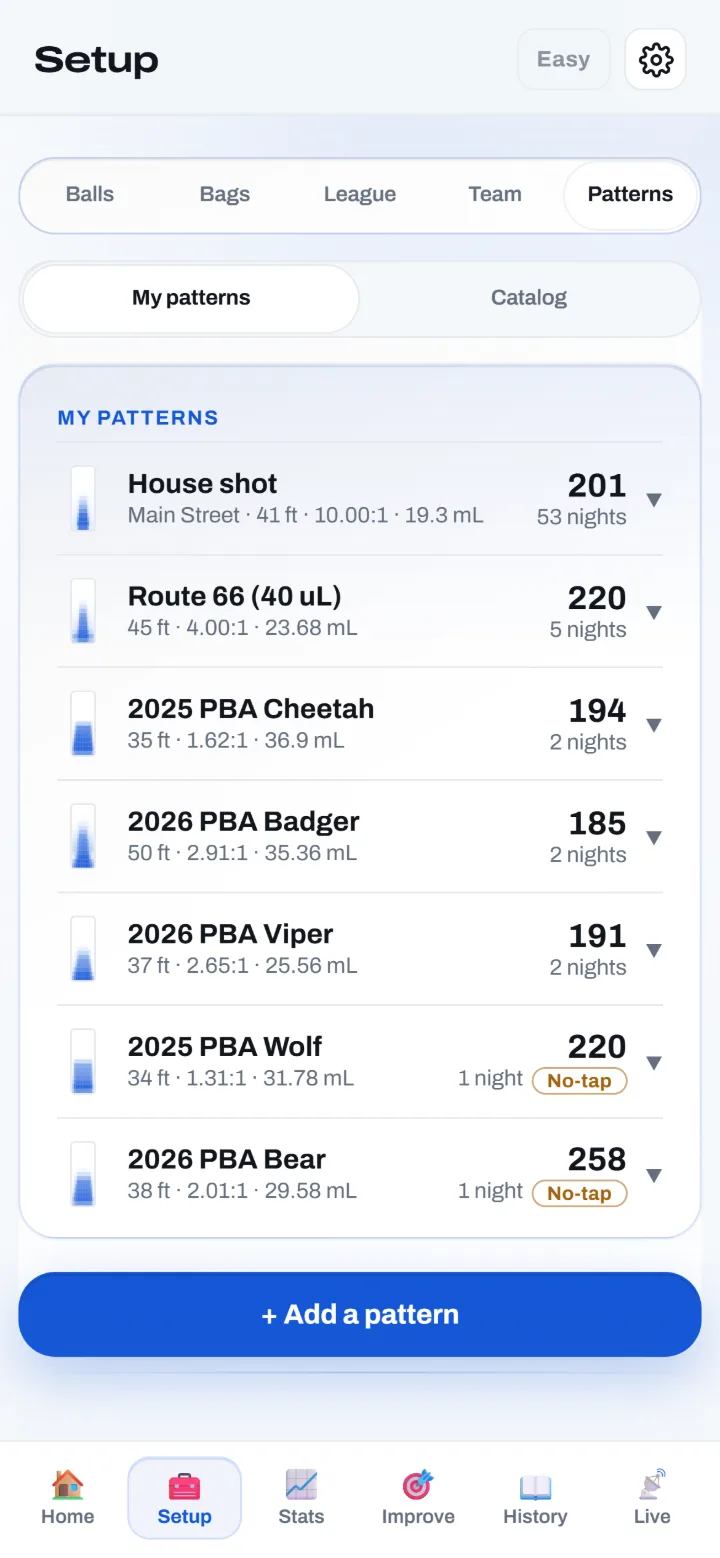
Each pattern
Each row shows:
- A small drawing of its oil. Tap it to open the whole lane.
- Its name and numbers (length, ratio and volume, like "45 ft · 4.00:1 · 23.68 mL"), or No numbers entered.
- On the right, your average on it and how many nights you've bowled it.
The patterns you've bowled most come first. House shot is always on the list and can't be deleted. A night with no pattern recorded counts as its league's usual pattern, or as a house shot when the league has none. Its drawing and numbers are Main Street's, the house pattern the app uses for every house shot.
What the average counts
- League nights and tournament days. Practice and open bowling nights are listed, but they never count toward the average, and neither do Baker tournament days. Nights you bowled as a sub count only when they're all you have.
- 10-pin nights only. A pattern with only 9-pin no-tap nights this season, or that has never had a 10-pin night, shows those instead, marked No-tap. Never both together.
Open a pattern
Tap a row to open it.
- Its numbers. A pattern you added yourself has boxes for Length (ft), Ratio and Volume (mL). A change saves when you leave the box, and reaches every night you bowled on it. A published pattern's numbers, and the house shot's, can't be changed.
- Your last three nights on it: the date, each game and the series, with a No-tap or Baker tag where one applies.
- See all nights › opens History with only this pattern's nights. See History: Sessions.
- Delete, for any pattern but the house shot.
Add a pattern
For a pattern that isn't in the catalog, like a house's own shot or a challenge pattern:
- Tap + Add a pattern under the list.
- Type its Pattern name.
- Type its length, ratio (like 3:1) and volume if you know them. All three are optional. A length outside 20 to 70 feet, or a volume over 100 mL, isn't kept.
- Tap Add.
It's in My patterns from now on, ready to pick on a night's Set up. See The Set up screen.
Delete a pattern
- Open the pattern and tap Delete.
- The app names the pattern and how many nights it comes off, like "Delete Route 66 (40 uL)? It comes off 5 nights. Their scores stay." Confirm.
The nights keep their scores and shots. From then on they read as if no pattern was recorded, and tournaments bowled on it lose the name. Pick the pattern again for a night and it comes back.
The lane, large
Tap a pattern's drawing to open its lane from the foul line to the pins: the oil, the distance every 10 feet, the arrows, and a dashed line where the pattern ends, marked with its length. The name and numbers are underneath. A left-hander's lane is mirrored, like every lane drawing in the app. Tap ✕, tap outside the lane, or use your phone's Back to close it.