 MY BOWLING JOURNEY
Open bowling is about the people. Its Results tab says who won tonight and hands out a few awards, and Standings keeps a running table of everyone you've bowled with.
Results
Tap End Open Bowling & View Results at the bottom (it saves the night), or the Results tab. It needs at least one score first, or it says Enter a score first.
How It Went 🎳 lists everyone on the sheet, best total first, each with all of their game scores, their total and their average. With more than one of you, they're numbered and the winner's row stands out. At the foot, the night in one line: "1742 pins between 3 bowlers · 63 pins first to last".
Under the scores, the awards, when the night earned them:
- Winner: the best total, and by how much. A close one says "That was close."
- Best Single Game: the night's highest game.
- Biggest Comeback: the biggest jump from one game to the next.
- Ran Out Of Steam: the biggest drop from one game to the next.
- Most Consistent: whose games stayed closest together, like "Every game within 12 pins." It needs at least two of you with three games.
If you bowled a 300, a Perfect game card above says so. Open bowling is never a series or a personal best, so there's no 800 or personal best card.
Share the night sends a picture of your games with the winner and the best game on it, and any badges you earned tonight.
When you're done, tap Save & Finish Open Bowling.
Standings
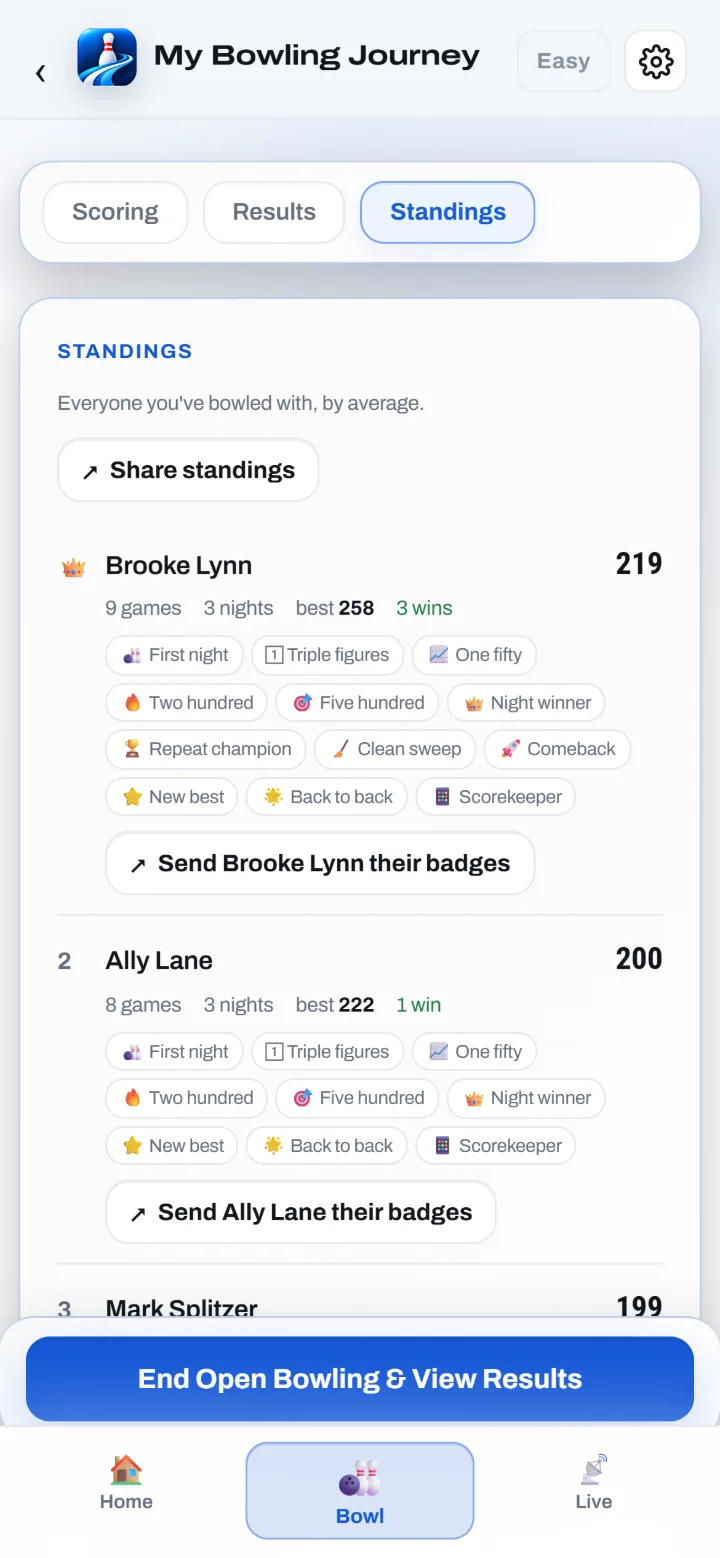
Tap the Standings tab, beside Scoring and Results. It's everyone who's been on your open bowling scoresheet, ranked by average across every night. The leader wears a crown, and your own row says "(you)".
Each row shows:
- Their average, big on the right.
- How many games and nights, their best game, and how many nights they won. A night is won on the best average, so someone who bowled more games doesn't win just by bowling longer.
- The open bowling badges they've earned, like Night winner, Two hundred or Wooden spoon.
With two or more people on it, Share standings sends the table as a picture.
Your badges and theirs
- Yours: under your row, See all my badges › opens your open bowling badges, earned and still to get. See Badges.
- A friend's: everyone else who has a badge gets a button like "Send Ally Lane their badges". It sends a picture of the badges they've earned on your scoresheet, so they can see them even without the app.
An old night
Open bowling nights you've saved are in History, under Sessions and on the Calendar. Open bowling's own bar has only Home, Bowl and Live, so History is there once you're back in the rest of the app. Tap one to see its Results again, with ‹ Back to History to go back. See History: Sessions.